












-
The rapid development of high-throughput sequencing technologies has driven the accumulation of multi-omics data centered around genomics, harboring abundant biological information[1]. However, in the journey from raw data to publishable results, researchers usually encounter the following challenges: Toolchains are complex, with diverse interdependencies; configuration of the environment is time-consuming and error-prone; command-line interfaces (CLIs) present a high technical barrier for researchers with primarily wet-lab backgrounds; and data visualization and statistical modeling demand proficiency in R or Python.
Existing bioinformatics platforms have made significant contributions in both visual workflow orchestration and code-based pipeline management. According to their driving modalities, these platforms can be roughly divided into two categories. The first category includes CLI-driven management tools, exemplified by Snakemake[2], which provide a structured framework for constructing workflows. Users define the pipelines through declarative code rules, offering high flexibility and extensibility. The second category comprises graphical user interface (GUI)-driven management tools, exemplified by Galaxy[3], which offer fully visual analysis environments for intuitive workflow management across all stages.
In practice, a trade-off between extensibility and usability has been readily obvious in both categories of workflow management tools. CLI-driven platforms delegate the full expression of computational logic to the users, saving the enormous cost of developing dedicated graphical interfaces for new tools, but sacrificing some usability in exchange for high flexibility. Correspondingly, GUI-driven platforms achieve higher usability by investing human effort in mapping command-line arguments to graphical interface elements, but this adaptation process itself constitutes a bottleneck to extensibility.
Recently released agent tools such as OpenClaw[4] and Claude Code[5] represent a new paradigm of deep integration between artificial intelligence (AI) and local computing environments[6]. These systems significantly expand the boundary of AI models' capacity to execute complex, real-world tasks by granting them the ability to invoke software applications installed on the local environment. Specialized agent toolkits for life sciences derived from this paradigm, such as ClawBio[7] and BioClaw[8], further combine this general capability with domain expertise, demonstrating substantial potential in automating bioinformatics workflows. Such agents not only inherit the core advantages of modern agent frameworks but are also endowed with an understanding of specific bioinformatics pipelines, such as amplicon and single-cell analysis workflows.
Nevertheless, the interaction between such tools and users is mainly centered on the user–agent side, which inadvertently weakens the connection between users and the underlying software. Although agents' top-down takeover of workflows could substantially improve efficiency under stable conditions, the system's inherent fragility becomes exposed when stability or reliability issues arise, posing challenges to the traceability, debuggability, and the credibility of the research outcomes.
Given this background, we proposed a novel workflow management framework integrating the characteristics of three tool categories (CLIs, GUIs, agents) to achieve a method that balances extensibility and usability, and introduces the assistance of large language models (LLMs) while preserving transparency at every stage of the workflow. Specifically, the framework retains the rule-based pipeline definition capability of CLI tools to maintain high extensibility for new tools. It uses LLMs to automatically map code-defined parameters to intuitive GUI interfaces, replacing the need for manual interface development. Additionally, the framework ensures that users can always clearly understand the computational logic of each step, guaranteeing the traceability and debuggability of the pipeline.
Among the various analysis pipelines, the 16S rRNA gene amplicon sequencing workflow is characterized by a clear, well-structured process, from sequence quality control, merging, dereplication, clustering or denoising, and chimera filtering to the final generation of the feature table, with each step having well-defined input/output format specifications and mature open-source toolchains (such as VSEARCH[9] and USEARCH[10]). These properties make the amplicon analysis workflow an ideal scenario for validating agent-assisted workflow capabilities, enabling an objective evaluation of how well AI assistance performs. Thus, we used the amplicon workflow as the test scenario to complete the design, development, and functional validation of this workflow management framework. This study is dedicated to exploring how to integrate LLMs into existing bioinformatics workflow management paradigms to balance extensibility and usability, to provide the research community with a solution better aligned with practical analytical needs.
-
The project adopts a classic frontend–backend separated architecture, with the two sides communicating through representational state transfer application programming interfaces (RESTful APIs) and websocket (Socket.IO). The system's architecture is shown in Table 1, and the software versions used for testing this project are shown in Supplementary Table S1.
Table 1. Architecture of the project's system.
Layer Component Technology chosen Responsibilities Frontend WebUI Vanilla JS single-page application (single-file index.html) User interface (UI) rendering, user interaction, terminal echo Backend API service FastAPI + Python-socketio RESTful API, asynchronous tasks, Socket.IO events AI layer Inference engine OpenClaw Gateway Session management, natural-language understanding, code generation,
tool invocation, environment repairRemote connection SSH emulation Paramiko + pseudo-terminal (PTY) Local terminal, remote server interaction The backend main file is "backend.py", which uniformly manages all API endpoints and Socket.IO events. Frontend resources are deployed as "frontend/index.html", supporting multi-tab management (environment construction, workflow, and R data analysis).
Automatic environment construction module
-
The environment construction module (Fig. 1) is one of the core modules of less is more boosts organization (LIMBO). The user inputs a working directory path and describes the bioinformatics workflow to be executed through the web user interface (UI). Following the inference chain, the step (process) and software lead to parameters, and when combined with these parameters, the associated input–output (I/O) formats can be determined. Therefore, the minimal acceptable description is as follows: Step (process), software. The agent is then invoked to query software information from the source websites, and the results are organized into four files as described below.
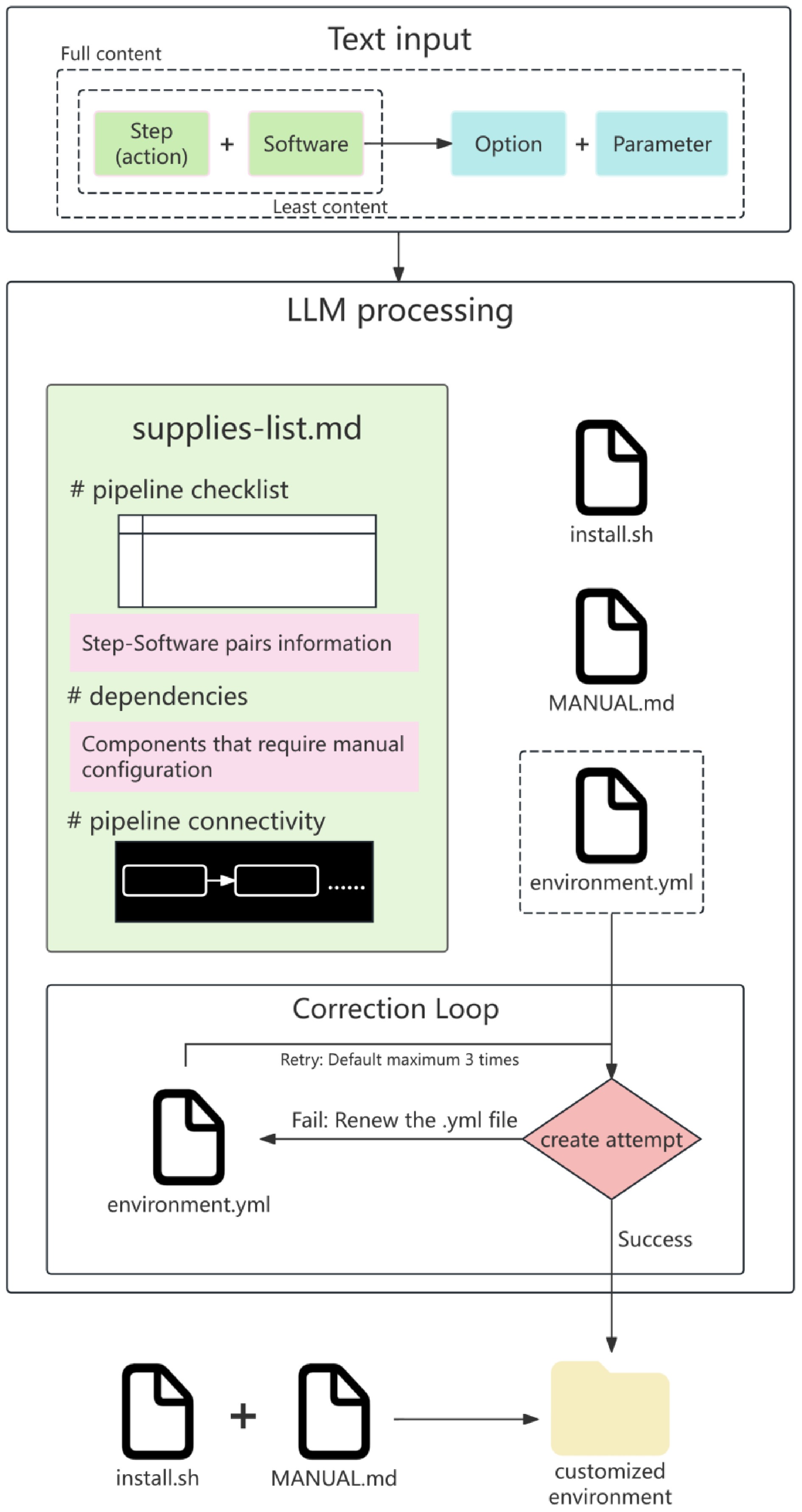
Figure 1.
Workflow of the automatic environment construction module.
"supplies-list.md": A tool dependency checklist, listing all required bioinformatics tools in three parts, namely (1) the pipeline checklist, which is a table recording each step's details (step, description, software, option/etc, input, output, check, and method); (2) the dependencies, which are descriptions of manually configured components including but not limited to annotation databases; and (3) the pipeline connectivity, checking I/O continuity between steps and rendering a pipeline diagram.
"environment.yml": A Conda environment configuration file containing channels, dependencies, and version constraints.
"install.sh": An automated installation script that runs after the Conda environment has been created.
"MANUAL.md": A manual containing instructions for steps that require manual operation.
The generated files are displayed as tabbed panels in the interface, allowing users to preview them. The task of creating an environment uses "environment.yml" via the "/api/env-build/create-env-with-fix" endpoint, implementing an automated correction loop via the OpenClaw default model. The number of correction rounds is user-configurable (default: 3). Combining automated installation scripts with manual configuration, a customized environment can be fully constructed.
Workflow management module
-
The workflow management module (Fig. 2) supports the browsing of predefined workflows and uploading of custom workflows. Each workflow contains (1) "config.json", a global workflow configuration (name, description, execution environment); (2) "params.json", parameter configuration (input paths, thresholds, output directories, etc.); and (3) "scripts/", a folder of scripts, with each step corresponding to one executable script. Workflows are managed through the "/api/workflow/list" and "/api/workflow/save" endpoints. The user can upload "supplies-list.md" through the web interface, and the platform automatically parses and generates the corresponding files, as shown in Fig. 2, and validates the structural integrity.
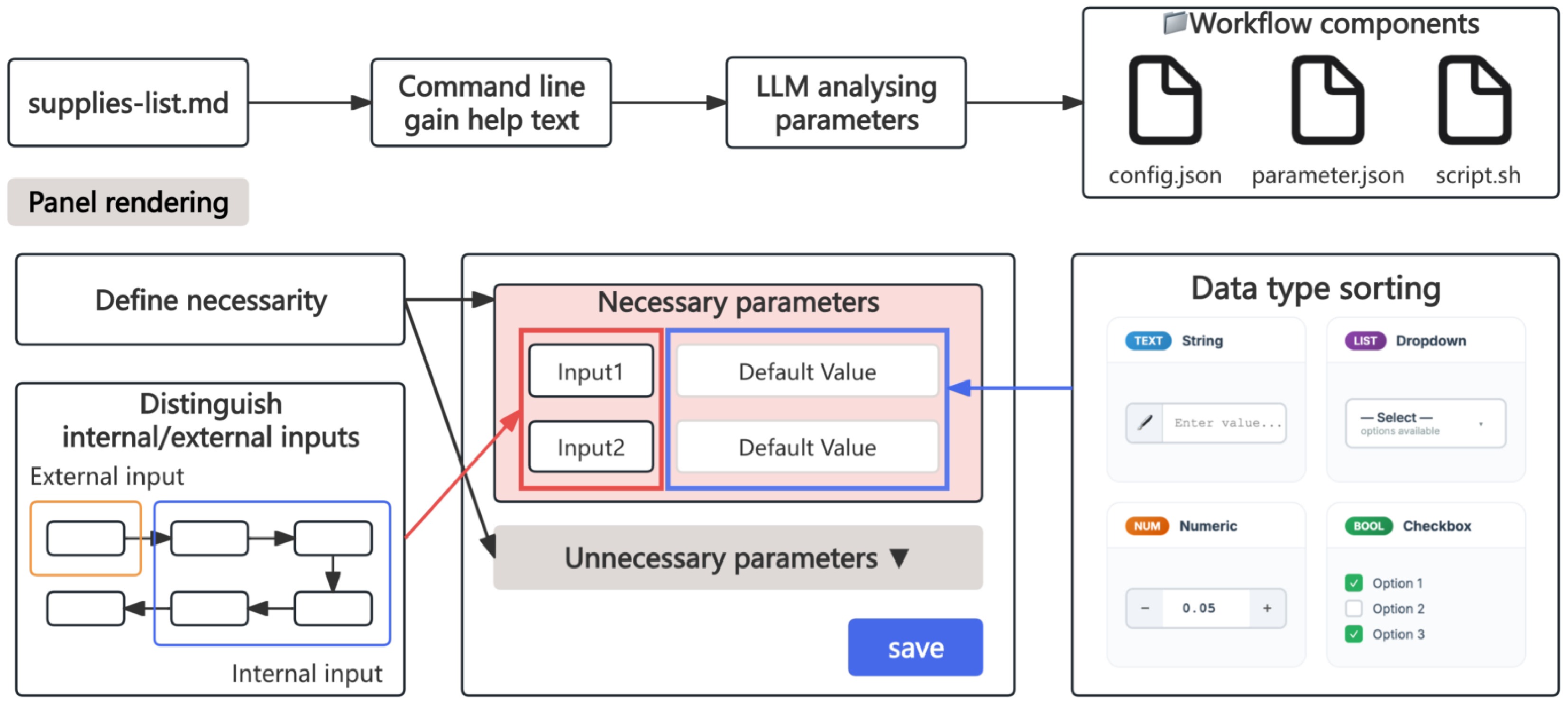
Figure 2.
Workflow of the workflow-management module.
The module retrieves real software help text through actual command execution and parses parameter information by interpreting the help text to obtain the parameters corresponding to each functional program. Parameter information is first classified as either required (needing manual input) or optional. The rendering logic differs for the two types. Required parameters are expanded by default for user input; optional parameters are folded by default and filled with the default values. Next, the data types and default values are defined. Different parameter types are presented with different input strategies in the configuration panel (string: direct input; numeric: step-wise adjustment; text options: dropdown list, etc.). Finally, according to the workflow sequence, the module determines whether an input needs to be provided externally or can be internally referenced from the previous step. Internally referenced inputs are automatically filled with default values. Parameter information is integrated into "params.json" to render the frontend configuration panel, while the command body is stored as scripts. User-configured parameters are stored in "params.json", and at the execution time, scripts are combined with the configuration to form complete commands.
R data analysis module
-
The R data analysis module (Fig. 3) provides built-in support for statistical visualization in bioinformatics. Users can upload (1) an abundance table (an operational taxonomic unit [OTU]/amplicon sequence variant [ASV] matrix with features as rows and samples as columns), (2) an annotation file (taxonomic classification information linked to the abundance table via feature IDs), and (3) a metadata file (sample groupings, experimental conditions, and other information).
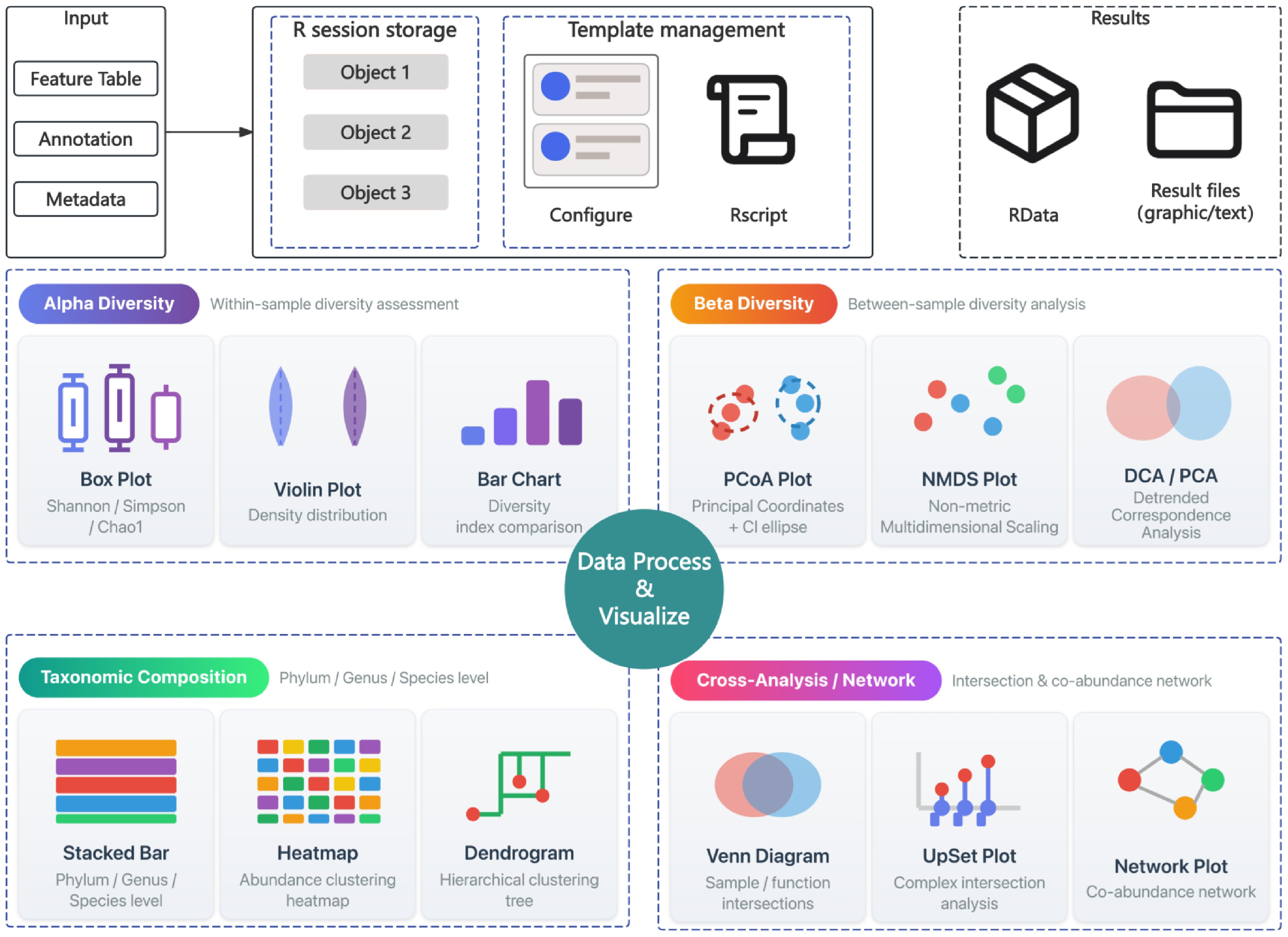
Figure 3.
Workflow of the R data analysis module.
The module connects to the R session through the VisualizationManager class in "r_plot_integration.py" to execute bound plotting and data analysis. The module is built on the R environment and supports packages commonly used for data analysis and visualization (vegan, ggplot2, etc.). The functional module follows the framework of the workflow management module as follows: "template.json" renders the frontend panel to provide input space, and "script.r" provides executable commands. Inputs can reference session-internal objects; output objects are stored in duplicate as RData and universal chart formats (PDF, SVG, CSV, TSV, etc.). Supported analysis types include but are not limited to α-diversity analysis (Shannon, Chao1, abundance-based coverage estimator [ACE], and other diversity indices), β-diversity analysis (principal coordinates analysis [PCoA], non-metric multidimensional scaling [NMDS], principal component analysis [PCA], and other dimensionality-reducing analyses), taxonomic composition analysis, and correlation analysis. Templates can be generated by input scripts through the "r_plot_agent".
Terminal emulation and SSH connection
-
The platform manages secure shell (SSH) sessions through the SSHConnectionManager class in "backend.py" and implements pseudo-terminal (PTY) emulation with the Python pty module. The Paramiko library handles the establishment of SSH connections and key-based authentication. Users can interactively operate remote servers in real time from the frontend, with support for concurrent multitab sessions. The Socket.IO event "terminal_output" streams PTY's output back to the frontend, whereas "terminal_input" receives user keyboard input and forwards it to the remote session.
Integration with AI agent chat
-
AI chat is served through the "/api/agent/chat" endpoint, which streams tokens back as a server-sent event (SSE). The session key follows the format "agent:limbo:{session_id}" and is passed to the OpenClaw Gateway via the "x-openclaw-session-key" request header. The gateway uses the default model for inference, and the authentication token is read automatically from "~/.openclaw/openclaw.json".
-
LIMBO is a local workflow management tool in which an LLM serves as an intermediate layer connecting CLI tools and GUI tools. When a workflow is created for the first time, the LLM automatically parses the help text of each software tool and generates the corresponding graphical parameter panels for each CLI command. Users no longer need to memorize complex command-line parameters. Configuration and management are completed through an intuitive GUI. After the initial setup, a tightly coupled collaboration loop forms among four parties, namely the users, GUI panels, the LLM, and the software, with more diverse interaction modes (Fig. 4). Users can directly modify the generated script files and submit them for terminal execution, continue tuning the parameters through the GUI panel, delegate subsequent analysis task orchestration to the LLM, or drive the LLM to re-render new parameter panels. The path from tool invocation to task takeover is extremely short, substantially improving the efficiency of analysis.
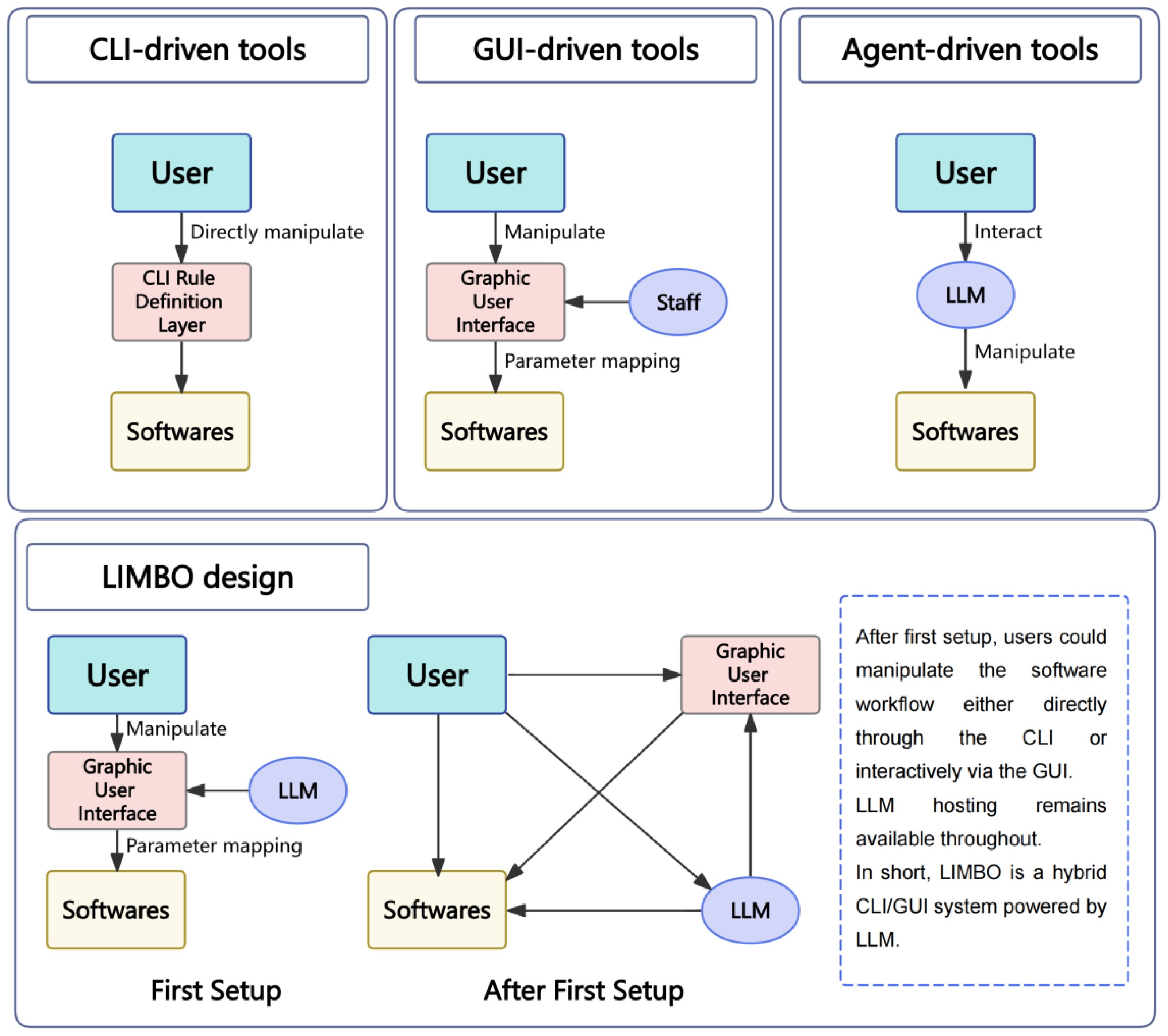
Figure 4.
Tool comparison and concept design.
The WebUI general design (Fig. 5) consists primarily of four parts: The header, sidebar, and the left and right main panels. The header, at the top of the interface, provides tab-switching controls and status indicators (connection status, working environment). The sidebar, on the left side, is the primary functional selection area. Key functional controls (environment settings, working directory settings, file import, etc.) are mainly integrated in the sidebar. The main interface is divided into the left and right panels, containing workflow card rendering area, the agent dialogue box, a file preview panel, environment object management, and log display. These areas constitute the primary user interaction zones.
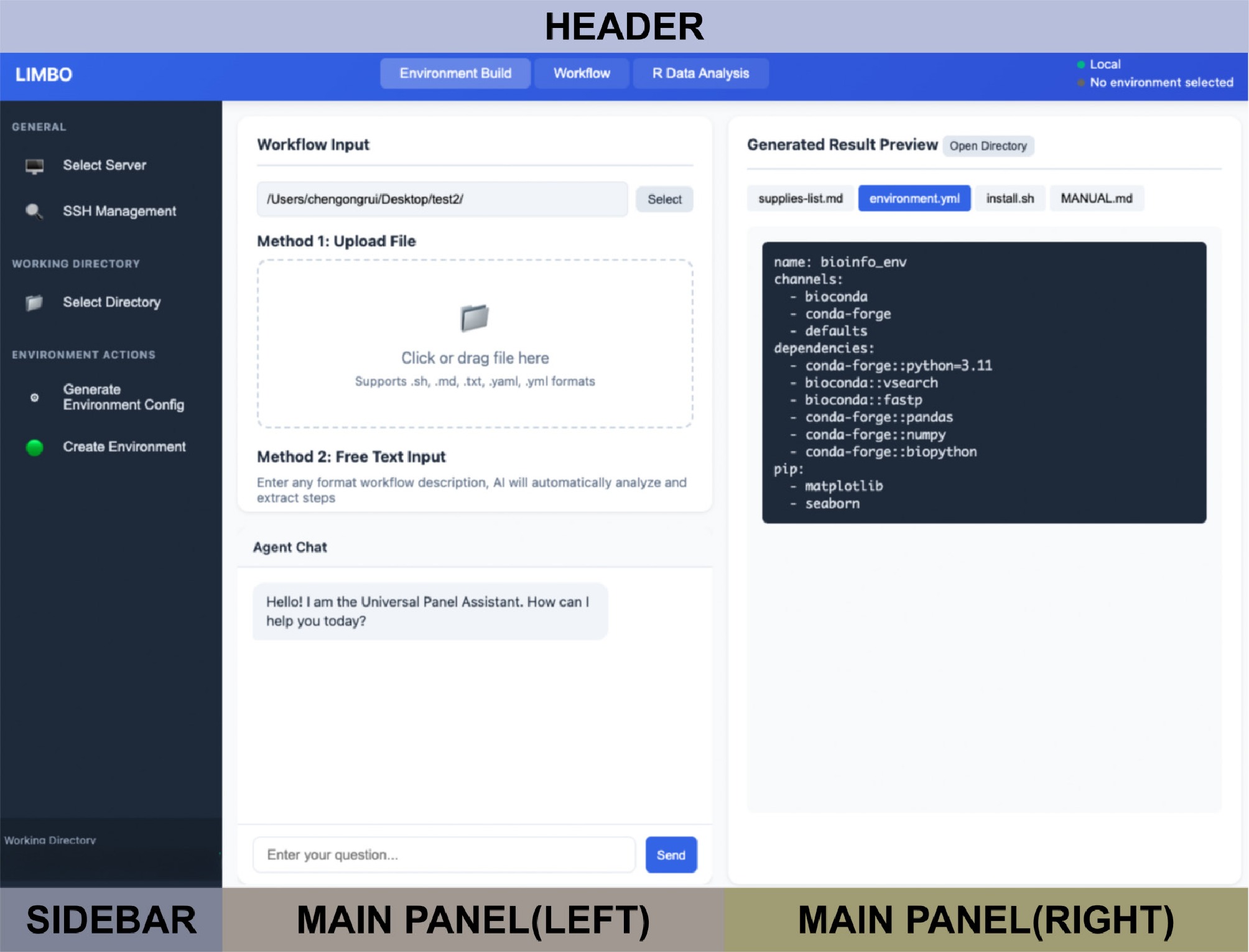
Figure 5.
General design of the WebUI interface.
Step 1: Preparation of the environment and execution assistance (trial run)
-
Before launching a new analysis project, the user first needs to prepare a computational environment (Fig. 6a). Specifically, the user selects a target server and a working directory, then uploads a workflow text describing the analytical pipeline to the system. At a minimum, this workflow text should contain two types of information: The operational content of each analysis step, and the name of the software on which each step depends.
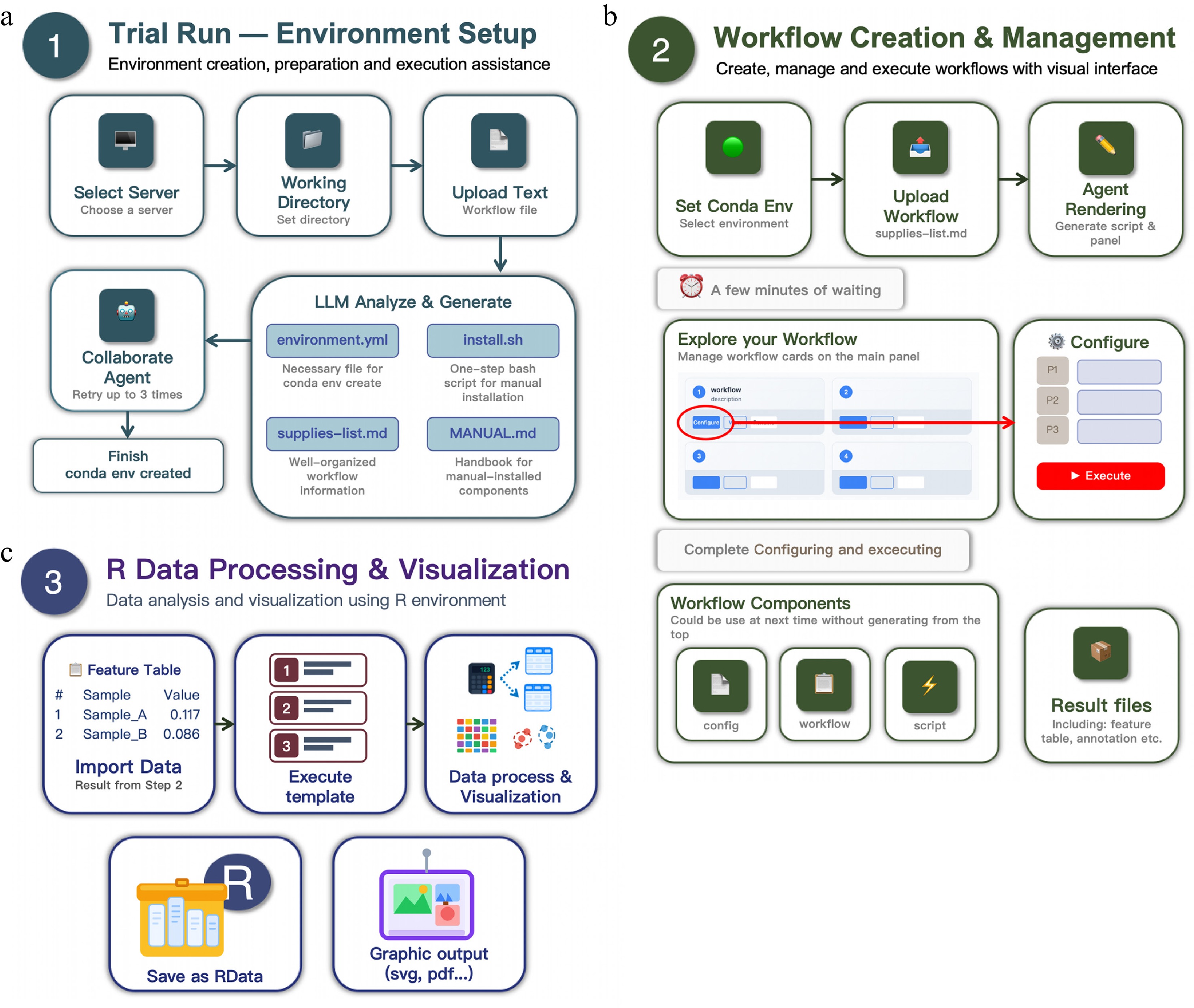
Figure 6.
Visual guide for LIMBO. (a) Trial run. (b) Workflow creation and management. (c) R data processing and visualization.
Once uploaded, the platform's built-in LLM module automatically parses the workflow text and generates a set of environment construction materials, including a prevalidated workflow checklist, a Conda environment configuration file, an automated software installation script, and supplementary manual installation instructions when necessary. After these materials have been generated, the user has two subsequent options. First, the user can independently set up the required computing environment using the materials. Second, the user can collaboratively complete environment creation with the agent within the platform. If the collaborative approach is adopted, the default setting allows up to three attempts per round to avoid excessive cycling on a single issue. The success rate of the three-round attempt is higher (approximately 93.33%) than that of the first-round attempt (approximately 23.33%), according to the configuration test (Supplementary Table S2). The number of rounds is user-configurable. If the environment is still not successfully created after exhausting the attempt limit, users could continue to interact with the agent in the dialogue box to further troubleshoot. It is worth noting that when previously created components already existed in the working directory, LIMBO automatically identified and loaded these historical components, eliminating the need for duplicate creation. Taking 16S rRNA gene amplicon sequencing as an example, a complete upstream workflow text should record at least the information presented in Supplementary Table S3.
Step 2: Workflow creation and management
-
After the environment has been created and all tool configurations are complete, the user can set the target Conda environment in the LIMBO panel and upload the "supplies-list.md" file generated in Step 1 to LIMBO (Fig. 6b). LIMBO first automatically verifies whether each software package in the checklist has been successfully configured in the actual computing environment, then leverages LLM capabilities to parse the help text of each tool and render the analytical workflow as a visual graphical workflow management panel; and the corresponding json template is shown in Supplementary Table S4.
Within each workflow card, each step of the analysis corresponds to an independent parameter item, listing all parameter entries for that step. Each parameter entry is annotated with the parameter's name (e.g., --fastq_mergepairs), label (e.g., forward FASTQ file), data type (string/numeric/flag), whether it is required, the default value, and a description of the parameter's meaning.
Taking the 16S rRNA gene amplicon analysis as an example, the workflow parameter card design enabled visual parameter input (Supplementary Fig. S1). Clicking "Configure" enabled visual parameter input. Additionally, software availability indicators are provided. For example, if software was not configured in the test environment, the panel would display a notification.
Step 3: R data processing and visualization
-
After the upstream analysis (Step 2) is complete and the resulting files such as the abundance table and the taxonomic annotation file have been obtained, users can import, process, and visualize data in the R Data Analysis panel of LIMBO (Fig. 6c). Clicking the "R Data Analysis" tab enters the workspace. First, a local working directory must be specified as the R project's root. The data upload function currently supports three file formats (CSV/TSV/TXT). Acceptable contents include but are not limited to a feature table (ASV/OTU abundance table), an annotation (taxonomic classification organized by kingdom/phylum/class and similar ranks), and a metadata file (sample groupings, environmental factors, etc.). After being uploaded, the data are automatically loaded into an R session and can be inspected in the object list. If an annotation file is uploaded, users may additionally select a taxonomic level and input processing instructions to split annotations by the specified level, generating new data objects for direct invocation by subsequent templates.
The R analysis templates are displayed as cards, with preconfigured modules including rarefaction, matrix reconstruction, α-diversity (Shannon, Chao1, ACE, and other diversity indices), β-diversity (PCoA, NMDS, PCA, and other dimensionality-reducing analyses), taxonomic composition analysis, and correlation analysis. The operational workflow is as follows: Click "Configure", select the corresponding R session object for each parameter item in the popup window, click "Save", return, and click "Run" to execute. LIMBO automatically renders and executes R scripts, with logs displayed in real time in the bottom Log Output area. Scripts are automatically saved to the "scripts/" directory.
The output results are saved in the "figures/" folder, the "scripts/" folder (which archives R scripts), and the "data/*.RData" files. These files are R session objects that can be imported into RStudio or other integrated development environments (IDEs) to view all processed objects for further refinement.
Cross-model LLM compatibility testing
-
The models selected for this test are seven LLM models commonly used at present: MiniMax-M3[11], MiniMax-M2.7[12], Kimi-k2.6[13], GPT-5.5[14], GLM-5.1[15], Qwen3.7-plus[16], and DeepSeek-v4-pro[17]. The test platform is macOS 26.4. The tested stages cover the main LLM-involved steps: Generation of environment construction components and rendering workflow-management components.
Input for the test of generating environment construction components is a fixed workflow text. The workflow text uses a VSEARCH/USEARCH hybrid pipeline, intended to test LIMBO's ability to recognize incompatible software (those that require Rosetta emulation on macOS or other non-86x systems). A test case is considered to have passed when the component's format is correct, the number of components is correct, and the software that requires emulation is correctly classified. Input for the test of rendering workflow management components is the "supplies-list.md" file produced by the test for generating environment construction components. A test case is considered to have passed when the following conditions are met: The component's format and count are correct, and the software requiring emulation is correctly classified. The performance of each model is evaluated in terms of the elapsed time and the token consumption of the passing test cases. The detailed test template is shown in Supplementary Table S5.
The experimental results (Supplementary Table S6) showed that only DeepSeek-v4-pro and MiniMax-M3 had failing instances in the workflow test stage. DeepSeek-v4-pro failed because of compatibility issues between OpenClaw's response handling and the upstream provider's streaming parsing, and MiniMax-M3 failed because the model's chain of thought exhausted the context budget during generation, leaving an insufficient budget for the output file. In terms of elapsed time (Fig. 7a), Qwen3.7-plus and MiniMax-M2.7 show significant advantages, with Qwen3.7-plus having the better stability (standard deviation [std] = 9.4). In terms of token consumption (Fig. 7b), DeepSeek-v4-pro shows the most prominent advantage, followed by MiniMax-M2.7, with MiniMax-M2.7 having better stability (std = 2.9).
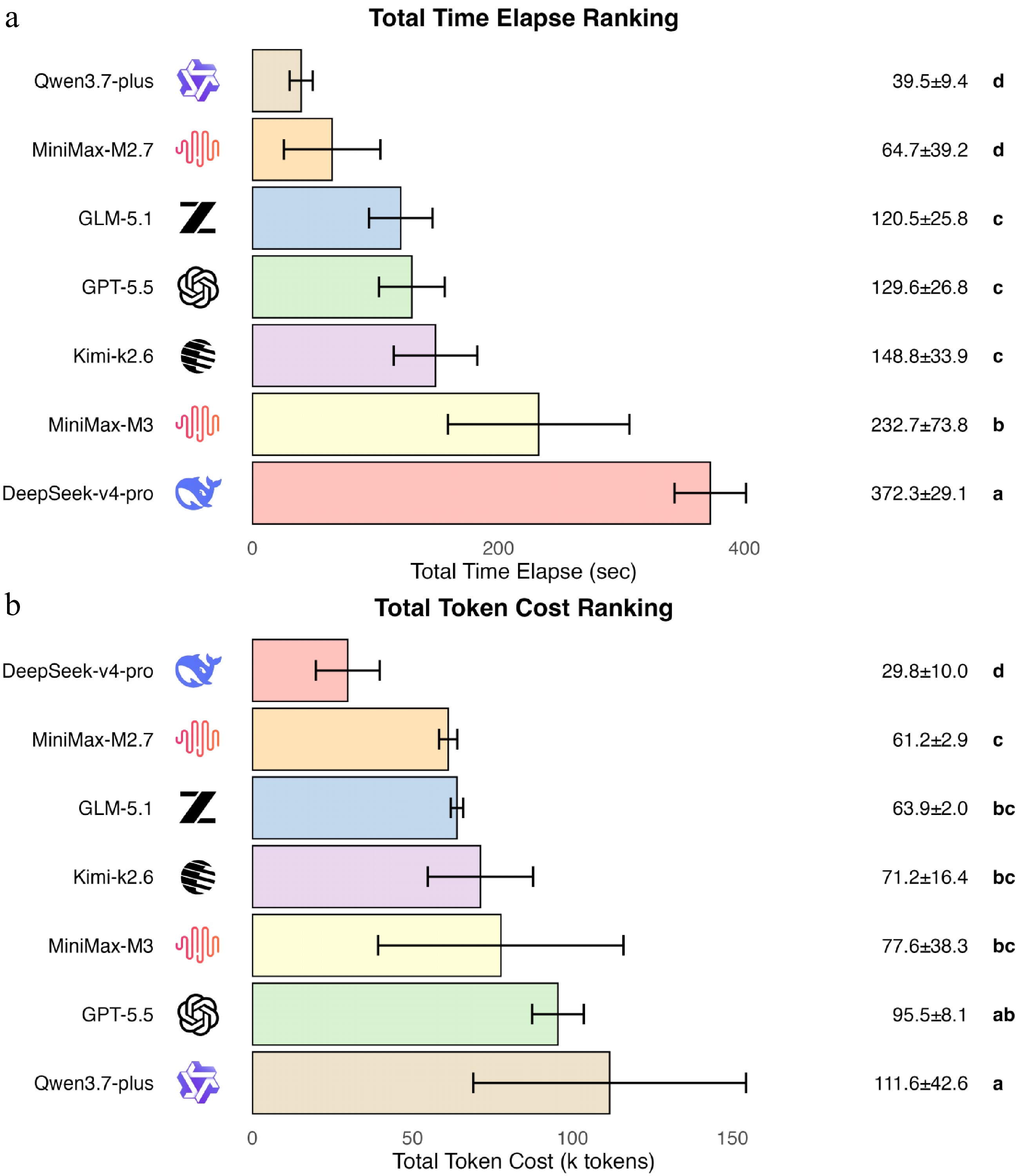
Figure 7.
Bar plot of performance rankings. (a) Total time elapsed. (b) Total token cost. Different letters indicate a significant difference (p < 0.05)
According to the test results, Qwen3.7-plus and DeepSeek-v4-pro exhibited completely opposite performance characteristics across the two metrics. Qwen3.7-plus has the fastest speed but the highest token consumption, whereas DeepSeek-v4-pro has the longest runtime but the lowest token consumption. Qwen3.7-plus's performance reflects the characteristic of a typical high-throughput model, which possesses significant advantages in short-duration long-text generation tasks, but this characteristic also led to increasing usage costs. The slower execution speed of DeepSeek-v4-pro may involve the same reason that causes its generation failure, namely streaming-related parsing incompatibility, and fluctuations in the network environment could not be ignored. MiniMax-M2.7 and GLM-5.1 ranked in the upper tier across both tests with relatively stable performance, making them the most recommended model choices among all tested models. GPT-5.5 demonstrated relatively stable testing performance with moderate speed and substantial data throughput, making it a suitable alternative for scenarios requiring stable output. Kimi-k2.6 and MiniMax-M3 exhibited high volatility in both time consumption and token usage across tests. In particular, MiniMax-M3 suffered from an issue with occupation of the chain of thought context budget, where high-pressure work scenarios could easily lead to incomplete output. These two models are not recommended for prioritization in the workflow's automated generation tasks. Our test only covers the performance of the current model versions under a specified workflow scenario; as the models are updated and optimized, each model's performance may change.
Tool boundaries
-
The universality of this project rests on the two operational conditions. On the environment side, a workflow falls within LIMBO's scope if its dependencies are resolvable through Conda. On the parameter-panel side, the CLI tool used in the workflow must expose a "--help" text that can be parsed by the LLM into a five-tuple (parameter's name, type, whether required, default value, description). Most mainstream bioinformatics tools satisfy both conditions; LIMBO is therefore universally applicable across this set of tools, but not across any analysis type or any data modality.
Within the boundaries declared above, LIMBO's scope of responsibility is to provide an intuitive and efficient configuration panel and structural validation capability. LIMBO does not optimize specific workflow processes; critical parameter settings and command execution remain the user's responsibility.
-
LIMBO's design philosophy is that "less is more boosts organization". Boosting organization is LIMBO's functional aspiration: To make every step of an analytical pipeline more intuitive, tidier, and more traceable, from configuration of the environment and workflow orchestration to data visualization. The tool is the interface, and the interface stands for order. "Less is more" is LIMBO's philosophy for applying LLMs: It concentrates on a restrained use of LLMs, invoking them only where they truly excel, such as parsing help text to generate parameter panels or understanding tools' semantics to assist orchestration, rather than using LLMs to replace everything. The LLM is a middle layer, not an all-purpose layer. Maintaining the boundaries of their responsibilities enables the tools to remain tools, and allows genuine intelligence to empower rather than introduce disorder.
Taking upstream 16S rRNA gene amplicon analysis as an example, the traditional workflow requires repeated installation and switching among multiple tools such as QIIME2[18], USEARCH[10], VSEARCH[9], mothur[19], and DADA2[20], each of which has its own Conda or pip dependencies and version constraints. Setting up the environments alone could take hours or even days. LIMBO condenses this process into a three-stage pipeline: Workflow text leads to a dependency checklist, which leads to execution. The users only need to describe the two minimal ingredients of the steps and the software. The platform automatically generates the environment configuration file, the executable installation script, and supplementary manual instructions. When dependency conflicts or network failures occur, the embedded AI-based self-correction loop reads the error log, automatically adjusts "environment.yml", and retries turning environment configuration into an observable, interruptible, and resumable process. Once the environment is ready, the workflow management module leverages the LLM to parse each tool's actual help text one by one, classifying command-line parameters (required/optional, string, numeric, etc.) and rendering them as collapsible graphical parameter panels. The panel automatically identifies I/O continuity between steps. For example, "--fastq" _mergepairs receives the merged output from the previous step, and "--otutab" is fed into downstream R analysis. The panel also provides availability notifications for unconfigured software. This approach transforms the workflow: Instead of repeatedly testing parameters in the terminal, users can now view, modify, and save them in the graphic panel.
LIMBO's core innovation lies in the integration of agent-based real-time generation and execution with bioinformatics-related environment management. Previous tools have relied on manual user-authored configuration files. This project introduces AI not only to assist in authoring but also to rapidly render a visual interface. Through that interface, bioinformatics analysis becomes less dependent on the command line, while still preserving the underlying components (scripts, etc.) for manual adjustment. LIMBO does not require users to sign up; the analytical environment is archived as a Conda configuration file and can be easily migrated to any other server that has the same configuration installed.
LIMBO was not designed to eliminate all the specialized knowledge required for analysis. As indicated by the "Materials and methods" section, it does not reduce the need for bioinformatics expertise; users still must independently acquire the necessary knowledge regarding which steps to follow, which software to use, and what parameters to specify. The true optimization of LIMBO lies in its approach to knowledge acquisition: It has shifted the process of accessing and understanding tool-specific parameter sets from a CLI-based content to a GUI-driven one.
The transition from the action of searching through long texts to a quick glance at the panel makes it immediately clear what aspects of the tool require the user's input, eliminating the need to read the entire text to understand the parameters. The GUI approach replaces the users' search efforts with intuitive information architecture.
From long scrollback and user-defined parsing texts to clickable forms with default values, default values are automatically filled and labeled as "Recommended", allowing users to instantly identify the starting point of community norms when making decisions. This approach clearly separates the two layers of responsibility, namely determining which aspects to examine and assessing the understanding of each aspect.
This represents a channel optimization: The core knowledge structure remains unchanged, evolving from flat long-text content to structured, labeled visual components with default values, enabling the users to progress from reading the entire document to skimming a structured list. Moreover, the GUI transformation not only alters the access pathway but also introduces an additional cognitive burden. Users must first read an untranslated document on their device before checking it in "-h", which increases the comprehension effort. The panel-based interface allows users to first identify clearly labeled fields before selecting what to focus on, eliminating the need for reading the full text, followed by verification. Although this improvement lacks quantitative data, it naturally extends the earlier channel change: Once the information architecture is properly implemented, the users' working memory load naturally decreases.
Functional comparison
-
The functional differences between LIMBO and the two established workflow managers in this field, Snakemake and Galaxy, are summarized in Supplementary Table S7. In terms of environment management, both Snakemake and Galaxy rely on administrator-managed Conda or container images. By contrast, LIMBO generates "environment.yml" from a workflow text description and runs an AI-driven self-correction loop, which means that changes in the environment are local to the user rather than managed by a system administrator. Definition of the workflow also differs across the three tools: Snakemake is built on Python with its rule being API (Python extended with a domain-specific language-like layer); Galaxy relies on a GUI-only pipeline editor; and LIMBO accepts workflow text input paired with an LLM-parsed help text parameter panel. The divergence in GUI support is even more pronounced: Snakemake does not offer a GUI; Galaxy provides a native GUI for the full pipeline lifecycle; and LIMBO delivers a GUI for the parameter panel layer, whereas the workflow's lifecycle itself is driven by the underlying CLI scripts. In terms of LLM integration, neither Snakemake nor Galaxy provides native LLM integration.
LIMBO is fundamentally a project built upon the OpenClaw framework. From a technical perspective, LIMBO's session management is implemented via OpenClaw to ensure transparency; moreover, its interaction components can be broken down into prompts or integrated into skills for use with generalist tools. Once a workflow configuration has been completed using LIMBO, it can be handed over to tools like OpenClaw for full automation; additionally, in practical applications of native generalist AI coding assistants, fine-tuning of the parameters typically requires the user to submit prompts or modify plan texts, a process that often incurs additional token costs and involves inefficient interfaces. This highlights LIMBO's advantage: As an auxiliary tool, LIMBO produces a visual parameter adjustment interface alongside plan generation, enabling more efficient user engagement while reducing costs.
Limitations
-
LIMBO's AI layer depends on a single protocol based on OpenClaw: The "/api/agent/chat" endpoint, the "agent:limbo:{session_id}" session key, the "x-openclaw-session-key" request header, and the "~/.openclaw/openclaw.json" authentication token. This single dependency exposes four risk surfaces, each with a concrete in-system mitigation solution.
(1) The protocol layer: A breaking revision to the OpenClaw protocol disrupts LIMBO's invocation chain. The mitigation is an "agent_backend/" abstraction layer, where LIMBO interacts with OpenClaw exclusively through a thin internal interface. This ensures that any future protocol changes are contained within the interface's adapter, rather than propagating to LIMBO's core codebase.
(2) The project-rhythm layer: If OpenClaw is discontinued, LIMBO will lose long-term AI maintenance support; the mitigation is a minimum-viable self-hosted backend implemented as an "agent_backend/" adapter that runs a local model.
(3) The licence layer: If OpenClaw shifts to commercial licensing restrictions, LIMBO will no longer be able to ship in open-source form; the mitigation is a permanent branch in the LIMBO repository that preserves the final MIT-compatible release.
(4) The credential layer: The risk stems from the local process read operation for the authentication token; the mitigation involves least-privilege token handling, file permission constraints, and log auditing, all scoped to the "agent_backend/" adapter.
Of the four risk categories, the protocol and credential layer risks are managed through routine project maintenance; the project-rhythm and licence layer risks are structural and are accounted for in the long-term roadmap (for example, the "agent_backend/" interface with fallback backends such as Claude Code SDK, local llama.cpp, and local vLLM).
Beyond these four in-system mitigations, a fifth category of resolution is available in modern agent ecosystems: Once a general-purpose tool-capable agent is configured with working code execution capabilities, a user can issue a request such as "help me adapt this project to the new OpenClaw release", and the running agent, which is itself the entity that LIMBO depends on, can generate the required patch and re-run the validation loop. This path is cross-system, not in-system; it does not reside within LIMBO's source code or release cadence but relies instead on the operational availability of a preconfigured agent.
Besides the risks associated with the single OpenClaw protocol, the current version has two other key limitations. The first is the limitation of resource consumption: Every AI-driven repair submits the full description of the workflow, the failed error message, and the current "environment.yml" together. As a result, the context length grows with the workflow's complexity, which directly translates to increased token cost. In multiround repair scenarios, failures from previous rounds are carried over into every subsequent API call, so the cumulative input length far exceeds what is required for a single round. The second limitation is that of the output's nondeterminism. Even with the same random seed and identical input, the LLM's output may still vary across runs. This makes the rate of successful repair a random variable rather than a stable metric, and this nondeterminism is further amplified over multiple rounds.
We plan to focus on the following directions in subsequent releases: (1) Containerization support, which would add optional support for containerization to meet higher isolation needs; (2) multiuser permission management, which would introduce user authentication and a role-based permission system to support team collaboration; (3) AI optimization of the workflow to further improve the generation quality for stable output and refine the AI script correction interaction, working toward the ultimate goal of "describe to analyze"; and (4) optimizing extensibility by actively considering more extensible solutions to support tools instead of OpenClaw.
-
In conclusion, LIMBO fulfilled its primary design purpose by connecting CLI and GUI with restrained application of LLMs, and it is considered to be a rather useful tool either for scenarios of practical bioinformatics analysis or for educational usage. LIMBO will further expand, support more analytical scenarios and data types in the foreseeable future with the development of LLMs and bioinformatics tools. It will continue to lower the entry barrier for beginners in bioinformatics and, through the integration of richer analysis modules and AI-assisted interpretation features, better meet the practical needs of scientific research and education.
-
The authors confirm their contributions to the paper as follows: study conception and design, analysis and interpretation of results: Chen G, Li S; data collection: Chen G; draft manuscript preparation: Chen G, Zhou H, Zhang X, Zhan J, Li S. All authors reviewed the results and approved the final version of the manuscript.
-
All source code and related scripts developed for this work have been deposited in a public GitHub repository and can be accessed at https://github.com/Listen-Lii/LIMBO-Less-Is-More-Boosts-Organization.
-
The authors declare that they have no conflict of interest.
-
This accompanies this paper online at https://doi.org/10.48130/gcomm-0026-0019.
- Supplementary Fig. S1 Example of the workflow configuration panel.
- Supplementary Table S1 Software version information used for testing LIMBO.
- Supplementary Table S2 Cumulative success rate of AI self-correction.
- Supplementary Table S3 Minimum required input for environment creation for 16S rRNA gene amplicon sequencing analysis.
- Supplementary Table S4 Template json for workflow creation.
- Supplementary Table S5 Model parameters and prompt setting.
- Supplementary Table S6 Cross-model LLM compatibility test results.
- Supplementary Table S7 Functional comparison of LIMBO with Snakemake and Galaxy.
- Copyright: © 2026 by the author(s). Published by Maximum Academic Press, Fayetteville, GA. This article is an open access article distributed under Creative Commons Attribution License (CC BY 4.0), visit https://creativecommons.org/licenses/by/4.0/.
-
About this article
Cite this article
Chen G, Zhou H, Zhang X, Zhan J, Li S. 2026. LIMBO (less is more boosts organization): a lightweight integrated modular bioinformatics orchestrator. Genomics Communications 3: e020 doi: 10.48130/gcomm-0026-0019 

LIMBO (less is more boosts organization): a lightweight integrated modular bioinformatics orchestrator
- Received: 22 June 2026
- Revised: 28 July 2026
- Accepted: 06 August 2026
- Published online: 01 September 2026
Abstract: Bioinformatics analysis workflows typically involve complex environment configurations, multitool integration, and demanding command-line interactions, all of which present a substantial technical barrier to researchers. To lower this barrier, we designed and implemented less is more boosts organization (LIMBO), a browser-based local bioinformatics analysis framework. This framework uses FastAPI as the backend framework, coupled with Python-socketio for real-time bidirectional communication, and integrates five functional modules: Workflow management, automated environment construction, R-based data visualization, pseudo-terminal emulation, and artificial intelligence (AI)-assisted dialogue. The environment's construction module incorporates an AI-driven self-correction mechanism capable of automatically diagnosing and resolving Conda environment configuration errors. The frontend is a single-page application that leverages server-sent event streaming to enable real-time AI interaction. The backend directly invokes the OpenClaw Gateway via routing, using the openclaw/default model for natural language understanding and code generation. We validated modules using a representative 16S rRNA gene amplicon sequencing workflow as a test case. The results demonstrated that LIMBO reshaped the entry points through which tool-level parameters and the conda resolution state are accessed, without removing knowledge content. LIMBO provides a unified, flexible framework that simplifies bioinformatics workflow construction and management, while leveraging large language model capabilities to guide non-expert users to find a way to learn how to comprehensively understand workflow details.
-
Key words:
- LIMBO /
- Bioinformatics /
- Workflow management /
- AI-assisted analysis /
- Agent